



Installation and Registration
Knowledge Base > FAQs
How do I install the software?
Where do I find my PC-Convey/PC-IFD Installation Code?
PC-Convey:
1. Right-click on the file you just downloaded (e.g. PC-Convey V15.00 Single-user Setup.exe) and select "Run as Administrator". If you don't have Administrator rights, please ask your IT people to install the software. If you receive a message asking "Do you want to allow the following program from an unknown publisher to make changes to this computer?" select "Yes" to install the software.
The InstallShield(R) Wizard will appear - follow the instructions to install the software.
The program will run in Demo mode until Registered with Integrity Software.
If, when running a Registered version of the software, you receive an error message when you try to save your file, please ensure that you have write access to the C:\Program Files (X86)\Integrity Software folder and sub-folders.
1. Right-click on the file you just downloaded (e.g. PC-Convey V15.00 Single-user Setup.exe) and select "Run as Administrator". If you don't have Administrator rights, please ask your IT people to install the software. If you receive a message asking "Do you want to allow the following program from an unknown publisher to make changes to this computer?" select "Yes" to install the software.
The InstallShield(R) Wizard will appear - follow the instructions to install the software.
The program will run in Demo mode until Registered with Integrity Software.
If, when running a Registered version of the software, you receive an error message when you try to save your file, please ensure that you have write access to the C:\Program Files (X86)\Integrity Software folder and sub-folders.
PC-IFD:
1. Open the folder you downloaded the file to and run the .exe file. You may receive a message saying that the publisher could not be verified - if so, confirm that you want to run the software.
2. You will see the Winzip Self-extractor form. Without altering the folder to unzip to, click on "Unzip". A new folder will be created in "C:\Downloads\Integrity Software" and the files will be unzipped. You should receive a message saying that the files have been unzipped. Close the Winzip Self-extractor.
3. Run the "setup.exe" file in the relevant "C:\Downloads\Integrity Software\" folder. This will install the program, which can then be run from the START menu or the icon on the desktop.
The program will run in Demo mode until Registered with Integrity Software.
1. Open the folder you downloaded the file to and run the .exe file. You may receive a message saying that the publisher could not be verified - if so, confirm that you want to run the software.
2. You will see the Winzip Self-extractor form. Without altering the folder to unzip to, click on "Unzip". A new folder will be created in "C:\Downloads\Integrity Software" and the files will be unzipped. You should receive a message saying that the files have been unzipped. Close the Winzip Self-extractor.
3. Run the "setup.exe" file in the relevant "C:\Downloads\Integrity Software\" folder. This will install the program, which can then be run from the START menu or the icon on the desktop.
The program will run in Demo mode until Registered with Integrity Software.
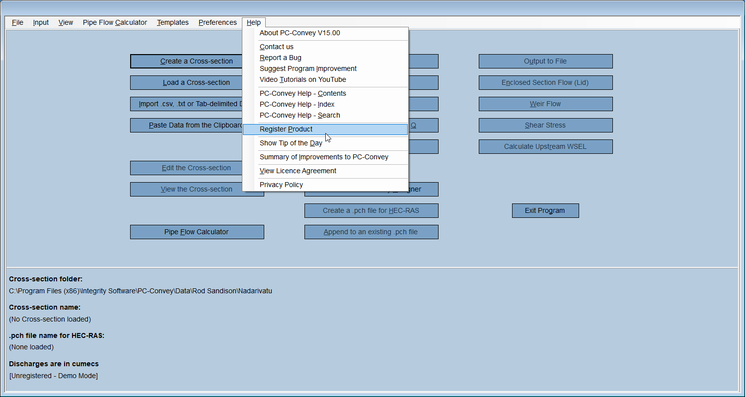
Until the software has been Registered, the Installation Code is found under Help\Register Product on the toolbar menu.
PC-Convey:
If you have purchased a Site or Company License there is no need to Register the software.
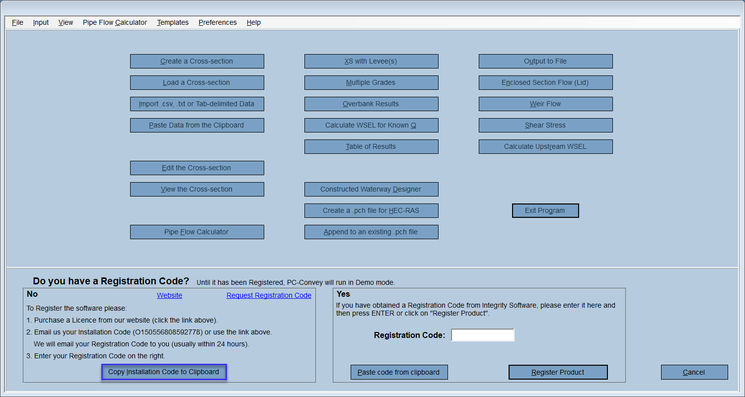
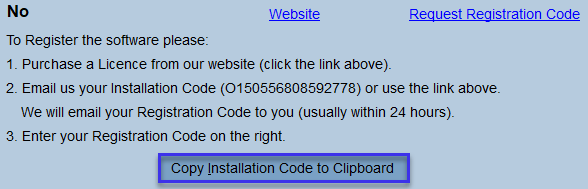
For Single-user Licenses, once you have purchased the License, select Help\Register Product from within PC-Convey. Copy your Installation Code to your clipboard using the button on the Register Program screen, then click on the link in Step 2 on that screen. Paste your Installation Code into the form, fill out the other details, then select the Send button.
We will e-mail your Registration Code to you (usually the same day). Select Help\Register Product and enter the Registration Code. This will unlock all the features of the program.
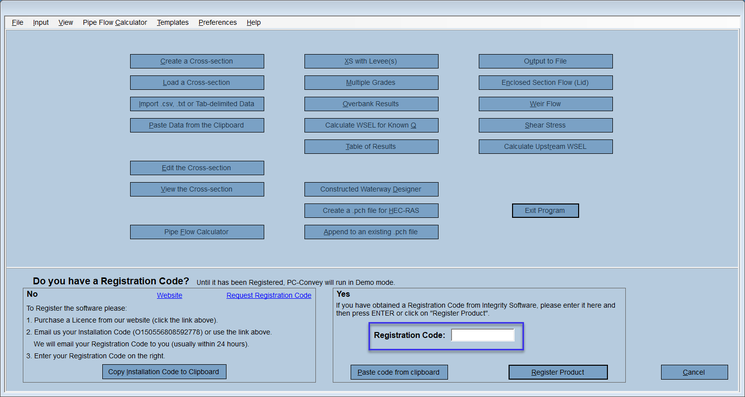
Once you have purchased the program, send us your Installation Code, which is found within the program under Help\About. We will e-mail the Registration Code to you (usually the same day). From within PC-Convey select Help\Register Product and enter the Registration Code. This will unlock all the features of the program. Registration is not necessary for Site Licenses.
If you can email us the Installation Code of the PC that is no longer being used (for our records, as this Code will no longer be supported) you can. Email us the Installation Code of the new PC as well and we will e-mail you a replacement Registration Code, usually the same day.
If you can email us the Installation Code of the PC that is no longer being used (for our records, as this Code will no longer be supported) you can. Email us the Installation Code of the new PC as well and we will e-mail you a replacement Registration Code, usually the same day.
Single-user Licenses run on 1 PC or laptop only. Current prices for additional Licenses can be found here.
Until it is Registered, the software will run in Demo mode. All of the features will be unlocked once you enter the Registration Code.